
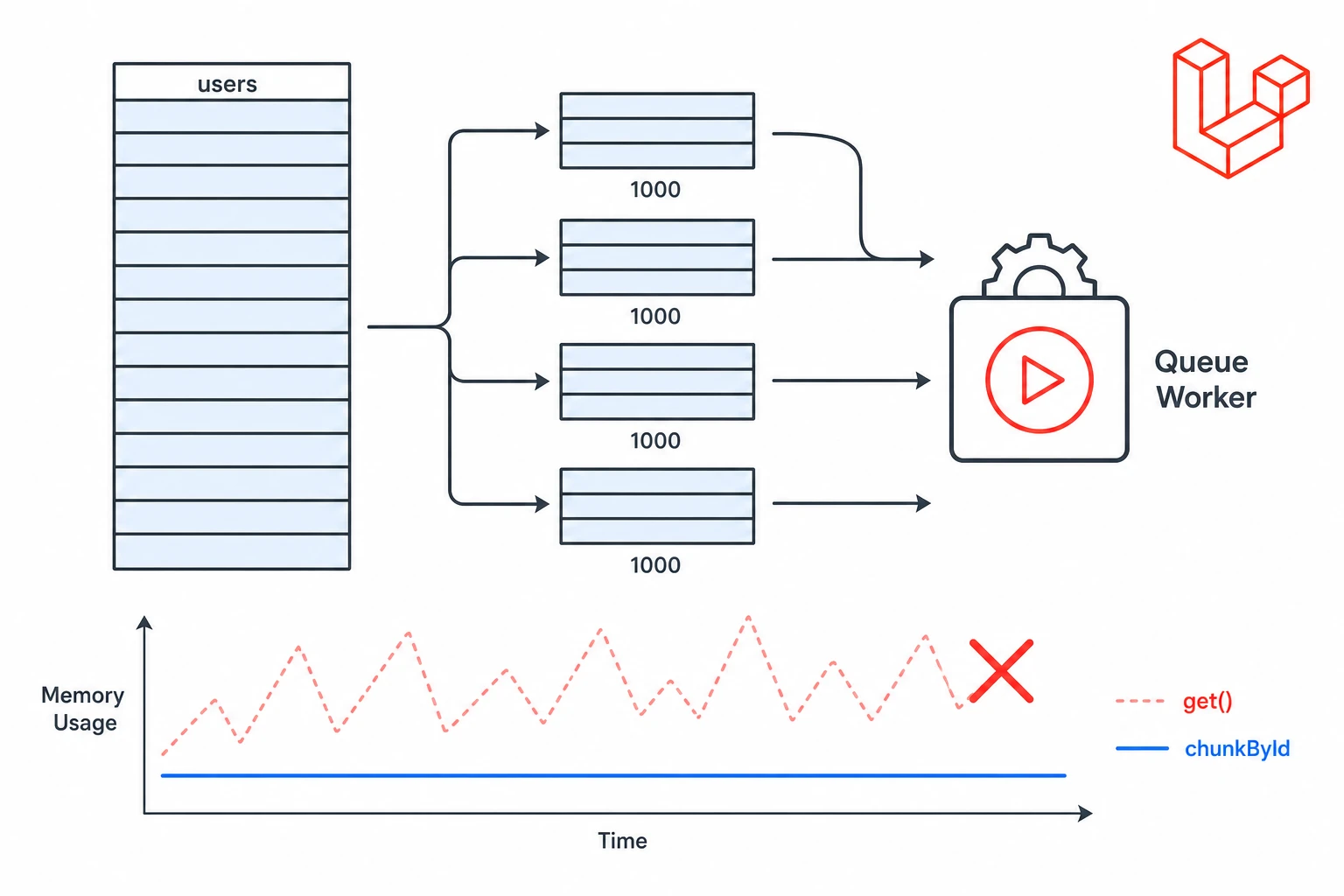
I ran into this problem while writing a scheduled command to send a monthly digest email to every active user on a growing SaaS app. The command worked perfectly in development. In production, against a users table with around 80,000 rows, the queue worker hit its memory limit and died quietly in the night.
The fix was not complicated. But it required understanding why the original code was wrong and which tool to reach for instead.
Why get() Becomes a Problem
When you call get(), Laravel runs the query, fetches the full result set and hydrates everything into memory. If you are using Eloquent, each row becomes a model object with its own attributes, casts, relationships and helper methods.
That is fine for normal application code. It is not what you want inside a queue worker or a scheduled command running against tens of thousands of rows.
// Loads every active user into memory before the loop even starts.
$users = User::where('active', true)->get();

foreach ($users as $user) {
    Mail::to($user->email)->send(new MonthlyDigest($user));
}
If the table has 80,000 users, you are holding 80,000 model objects in memory before a single email goes out. The loop is not the problem. The problem is that get() loads everything up front.
For small, known result sets, get() is fine. For large datasets, it is a sign to choose a more deliberate approach.
Use chunkById() for Batch Work
chunkById() is usually the right default for large batch processing. It retrieves a limited number of records, lets you process them, then moves on to the next batch — keeping memory usage roughly constant throughout the job.
User::where('active', true)
    ->chunkById(1000, function ($users) {
        foreach ($users as $user) {
            Mail::to($user->email)->send(new MonthlyDigest($user));
        }
    });
You may also see examples using chunk(). That works for read-only jobs, but be careful when records are being updated while the job is running. Because chunk() uses offset-based pagination, modifying the underlying data mid-loop can cause rows to be skipped or processed twice.
chunkById() avoids this by paginating using the primary key instead of an offset, which gives you stable results even when records change during processing.
Watch Out for Memory Leaks Inside Chunks
Even with chunkById(), memory can creep up if you are not careful. A common mistake is accumulating results in an array inside the callback without realising it.
$results = [];

User::where('active', true)
    ->chunkById(1000, function ($users) use (&$results) {
        foreach ($users as $user) {
            $results[] = $user->id; // This grows unbounded.
        }
    });
If you do need to collect data across chunks, process and flush it inside the callback rather than after. And if a chunk is doing heavy work with lots of temporary objects, unset() on variables you no longer need, or calling gc_collect_cycles() at the end of each chunk, can help in edge cases where PHP's garbage collector needs a nudge.
Use lazy() When You Want to Loop Naturally
Sometimes you do not want to think in batches. You just want to loop through matching records without loading all of them at once.
That is where lazy() is useful.
User::where('active', true)
    ->lazy()
    ->each(function ($user) {
        Mail::to($user->email)->send(new MonthlyDigest($user));
    });
Behind the scenes, Laravel still retrieves records in chunks, but your code reads like a simple loop. This is a good fit for long-running tasks where each record can be handled independently.
If you are updating the same records you are reading, prefer lazyById() instead. Like chunkById(), it moves through the table by primary key rather than offset, so updates do not interfere with pagination. lazyById() requires Laravel 9 or later.
User::whereNull('digest_sent_at')
    ->lazyById()
    ->each(function ($user) {
        Mail::to($user->email)->send(new MonthlyDigest($user));

        $user->update(['digest_sent_at' => now()]);
    });
Consider cursor() for Read-Only Streaming
Laravel's cursor() streams one model at a time from the database using a generator, which can give you extremely low memory usage.
foreach (User::where('active', true)->cursor() as $user) {
    Mail::to($user->email)->send(new MonthlyDigest($user));
}
The catch is that cursor() keeps the database connection open for the entire duration of the loop. If your processing is slow — waiting on external APIs, sending emails through a third-party service, or doing complex calculations — you are holding that connection open for minutes. Depending on your database driver, server timeout settings and connection pool configuration, this can cause problems at scale.
I reach for cursor() when processing is fast and read-only, and I know the loop will complete in seconds. For anything heavier, ID-based batching with chunkById() or lazyById() is easier to reason about and safer in production.
Select Only the Columns You Need
An easy and often overlooked win is to stop selecting data you are not going to use.
User::select('id', 'name', 'email')
    ->where('active', true)
    ->chunkById(1000, function ($users) {
        foreach ($users as $user) {
            Mail::to($user->email)->send(new MonthlyDigest($user));
        }
    });
This matters more than it looks. Large text columns, JSON columns, binary fields and unnecessary timestamps all add up per row. If the only columns you need for sending an email are id, name and email, there is no reason to hydrate everything else.
The same applies to relationships. Eager loading is useful for avoiding N+1 queries, but pulling in related models for a large export multiplies memory usage quickly. Only load what you actually need.
Use the Query Builder When Eloquent Is More Than You Need
Eloquent is one of the reasons many of us like Laravel. But for heavy read-only tasks — exports, reporting, data migrations — model hydration, casts, accessors, events and timestamps can be pure overhead.
For those jobs, the query builder is lighter and often faster.
DB::table('users')
    ->select('id', 'name', 'email')
    ->where('active', true)
    ->orderBy('id')
    ->chunkById(1000, function ($users) {
        foreach ($users as $user) {
            // $user is a plain object, not an Eloquent model.
            Mail::to($user->email)->queue(new MonthlyDigest($user));
        }
    });
You do not get full Eloquent models, but for jobs where you are just reading fields and doing something with them, a plain row object is enough.
A Practical Decision Guide
- Use
get()for small, known result sets where you need the full collection in memory. - Use
chunkById()for large batch processing, especially when updating records. - Use
lazy()orlazyById()when you want simple loop syntax without loading everything at once. - Use
cursor()for fast, read-only streaming where the loop completes quickly. - Use the query builder when Eloquent hydration is overhead you do not need.
- Always select only the columns and relationships the job actually requires.
Large datasets require a different mindset from everyday application code. The approach that feels natural for 200 rows is often the wrong choice for 200,000. Pick the right tool once, and you probably will not have to think about it again.